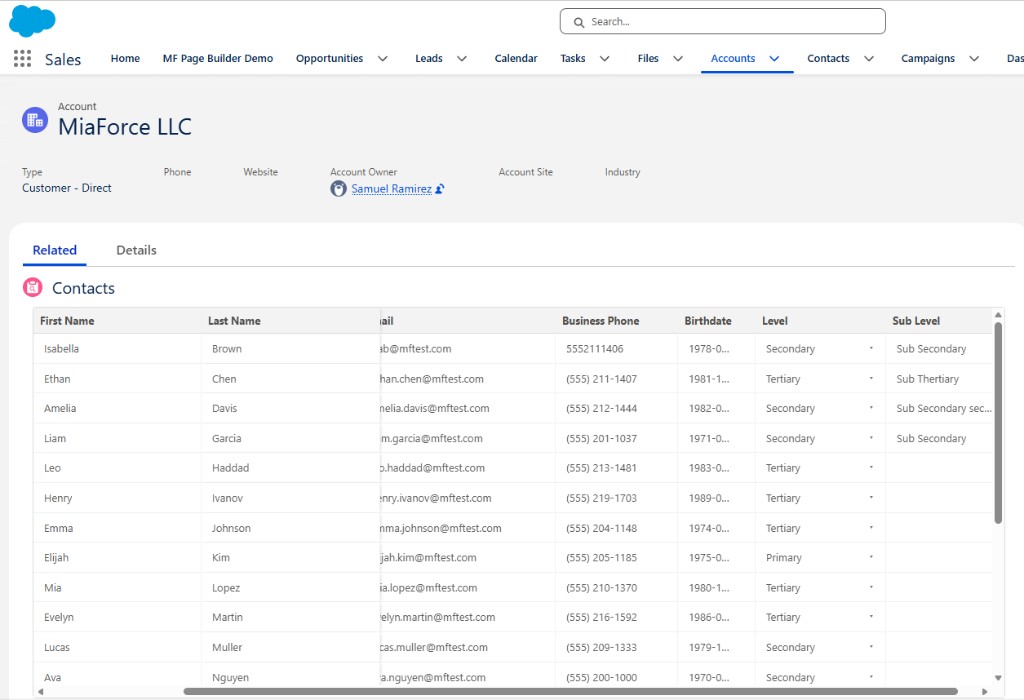
Opening a hundred records one by one to fix a field is nobody's idea of a good afternoon. Users want a spreadsheet: see many records, click a cell, change it, save. Salesforce's base lightning-datatable gets you partway there — until you need picklists, frozen columns, or clean validation errors. Here's what a production-grade editable datatable needs and how to build one.
Where the standard datatable stops
The base lightning-datatable supports inline editing for simple types, and it's great for a quick grid. But real business screens hit its limits fast:
- Picklists don't edit as true comboboxes, and there's no awareness of record types or dependent picklists.
- Frozen columns aren't supported, so with many fields you lose track of which record you're editing.
- Column widths aren't easily controllable or resizable by the user.
- Validation errors come back as raw DML exception text — "First exception on row 2 with id 003…; FIELD_CUSTOM_VALIDATION_EXCEPTION" — which is useless to an end user.
You can bolt custom cell types onto the base component, but past a certain point a purpose-built table gives you cleaner control.
Click-to-edit, not always-on inputs
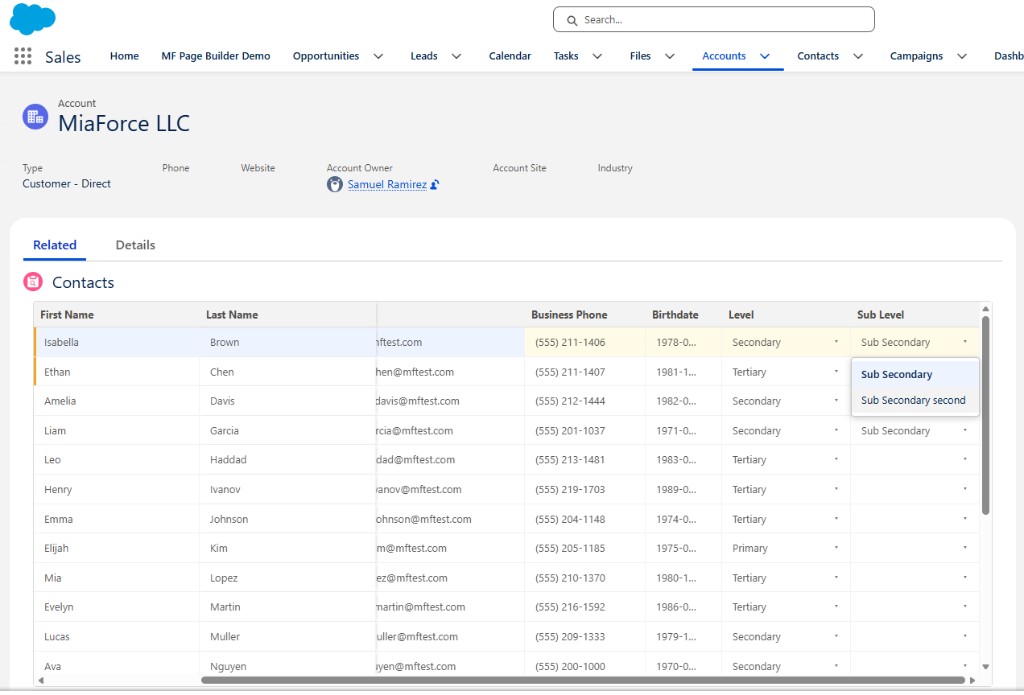
A good editing experience keeps cells as read-only text until the user clicks one, then reveals the appropriate editor — a text input, a number input, a Salesforce date picker, or a picklist combobox. This keeps the grid scannable and avoids the "wall of input boxes" feel. Editors that could be clipped by a scroll container (picklists, date pickers) should render in a fixed-position popover so they're never cut off, even when the table has a single row.
Rich editors for real field types
The editor should match the field's metadata, resolved server-side from the Schema describe:
- Picklists render as comboboxes. Values are fetched per record type using the UI API's
getPicklistValuesByRecordType, which also gives you correct dependent picklist filtering — pick a Level and the Sub-Level list narrows automatically. - Dates use the native Salesforce date picker for a familiar experience.
- Email, number, currency, and URL fields validate on the client before save, so obvious mistakes never reach the server.
Frozen and resizable columns
When a table is wide, freezing the first one or two columns (the record's name) keeps context pinned while the user scrolls right. Both the number of frozen columns and per-column widths are worth exposing as configuration, and letting users drag column borders to resize makes the grid feel like the spreadsheet they wanted.
UX detail that matters: highlight the row currently being edited, and mark changed cells before save. Users trust a bulk-edit tool far more when they can see exactly what they've touched.
Turning ugly DML errors into clear feedback
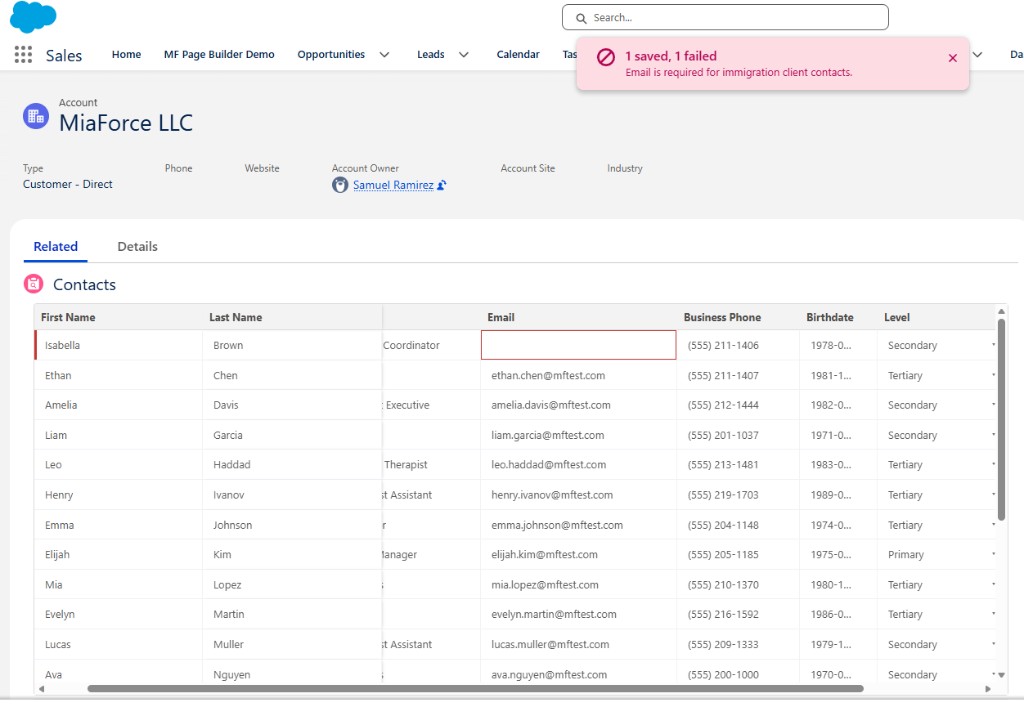
This is where most editable grids fall down. When a validation rule fires on save, don't surface the raw exception. Instead, do a partial save so valid rows commit, and report each failure cleanly:
List<Database.SaveResult> results =
    Database.update(records, false, AccessLevel.USER_MODE);
for (Integer i = 0; i < results.size(); i++) {
    if (!results[i].isSuccess()) {
        for (Database.Error err : results[i].getErrors()) {
            // err.getMessage() -> "Email is required for immigration client contacts"
            // err.getFields()  -> ['Email']  (highlight these cells)
        }
    }
}
The component keeps the drafts for the rows that failed, shows the message alone (not the wrapped stack), and highlights the offending cells in red so the user knows precisely what to fix. Valid rows are already saved.
Configuration over code
All of this should be declarative. The MF Editable Datatable accelerator drives everything from an MF_Datatable_Config__mdt record: the object, the SOQL to load rows, which columns are editable, which are frozen, and column widths. Because it runs in USER_MODE, it respects the running user's FLS, CRUD, and sharing, and validation rules still apply on save.
Frequently asked questions
Can the standard lightning-datatable edit picklists inline?
Not natively as comboboxes. The base component edits basic types but doesn't offer true picklist dropdowns with record-type and dependency awareness, which is why teams build a custom datatable for that.
How do you mass-edit records on a record or app page?
Place a configurable editable datatable on the page, click cells to edit inline, then save all changed rows at once. A partial save keeps valid rows and reports errors per row.
How are validation-rule errors shown?
With a partial save that keeps drafts for failed rows, a clean per-row message instead of raw DML text, and highlighted offending cells so the user knows exactly what to fix.