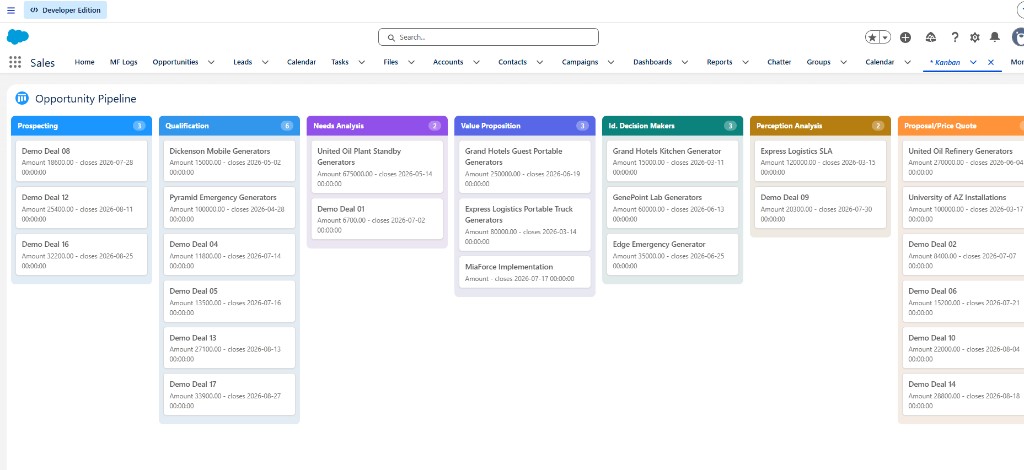
A Kanban board is the fastest way to see "what's where" — deals by stage, cases by status, candidates by pipeline step. Salesforce ships a Kanban list view, but it's constrained in where it lives and what it shows. A Lightning Web Component gives you a board for any object, on any page, configured entirely in metadata.
Why not just use the standard Kanban view?
The built-in Kanban view is genuinely useful and worth using when it fits. Its limits show up when you want to:
- Embed a board on a record page (e.g. all opportunities for an account) or an app/home page, not just a list view.
- Control the card content — title plus a templated subtitle like "Amount {Amount} · closes {CloseDate}".
- Give each column its own color, or scope the cards with a custom filter.
- Reuse the exact same component across many objects without rebuilding it each time.
A metadata-driven LWC covers all of these with one reusable component.
Columns come from a status picklist
The core insight: the board's columns are the active values of a picklist field. Point the component at an object and its status field, and Apex builds the columns from the picklist describe — in the org's defined order — so the board always matches your process:
Config:          Opportunity_Pipeline
SObject:         Opportunity
Status Field:    StageName        // columns = active StageName values
Title Field:     Name
Subtitle:        Amount {Amount} - closes {CloseDate}
Relationship:    AccountId        // optional: scope to a record page's Account
Filter:          (optional SOQL WHERE fragment)
Drag to update the record
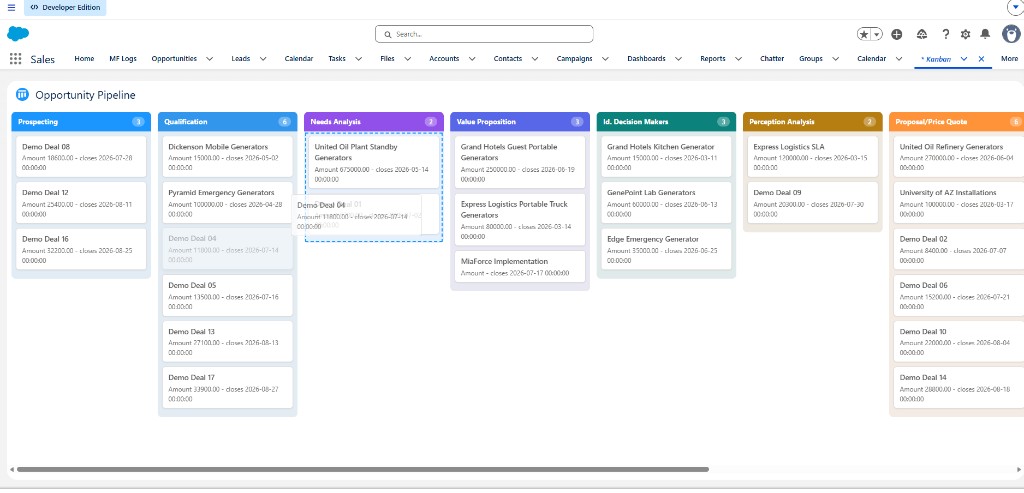
Cards are draggable with the native HTML5 drag-and-drop API. When a card is dropped in a new column, the component writes that column's value to the record's status field through an Apex update that runs in user mode — so field-level security, sharing, and validation rules all still apply:
@AuraEnabled
public static void updateStatus(String objectApiName, Id recordId,
                                String statusField, String newStatus) {
    SObject record = Schema.getGlobalDescribe().get(objectApiName).newSObject(recordId);
    record.put(statusField, newStatus);
    Database.update(record, AccessLevel.USER_MODE); // respects FLS + validation
}
The refresh gotcha (and the fix)
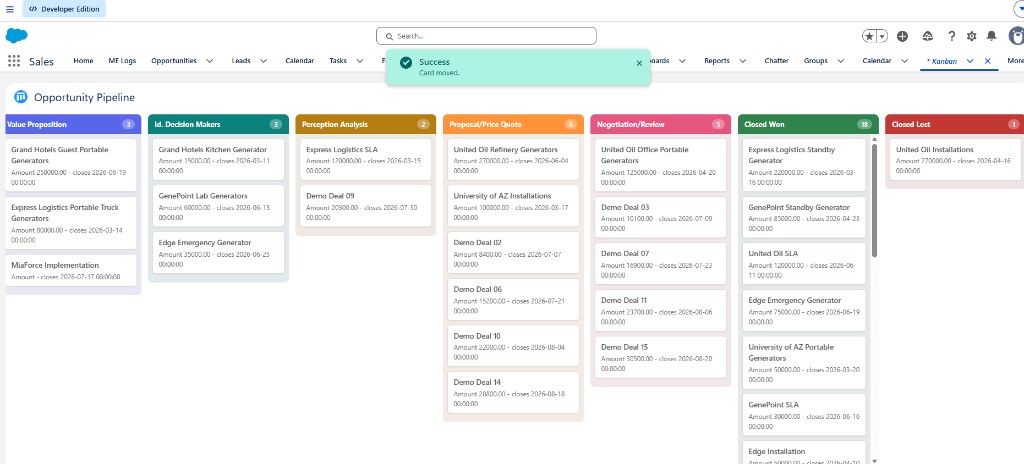
A subtle bug bites almost everyone who builds this: after the drop, you re-query the board to refresh it — but if the board's read method is @AuraEnabled(cacheable=true), the imperative re-query returns the cached (pre-move) data, and the card visually snaps back to its original column. The clean fix is an optimistic in-place move: once the Apex save succeeds, move the card between columns in the component's own state and recompute the counts. It's instant and never stale:
// after updateStatus resolves successfully
moveCardLocally(recordId, newStatus); // splice from old column, push to new, update counts
Polish: a lifted, semi-transparent card while dragging, a highlighted drop zone, and a brief "landing" animation make the board feel responsive. Per-column colors — from an automatic palette or explicit hex values — make status obvious at a glance.
Configuration, not forks
The whole point is one component, many boards. The MF Kanban accelerator drives everything from an MF_Kanban_Config__mdt record — object, status field, card title and subtitle template, optional relationship scope and filter, and per-status colors — so a new board is a metadata record, not a new component. It works on record, app, and home pages alike.
Frequently asked questions
Does Salesforce have a Kanban view for custom objects?
The standard Kanban list view works on many objects but is limited in layout, card content, and placement. For full control across custom objects and page types, a Lightning Web Component is the flexible option.
How does drag-and-drop update a record?
Dropping a card in a new column writes that column's value to the record's status field via an Apex update in user mode, so permissions and validation rules still apply.
Why doesn't my Kanban refresh after moving a card?
Re-querying a cacheable Apex method returns stale cached data, so the card snaps back. Use an optimistic in-place move: update the card's column in component state right after the save succeeds.